
10 Common Online Threats; the Details is Here

There is no doubt that you need to be careful online. As the World Wide Web has emerged over the years, many online perpetrators have been playing to attack computers and capture sensitive data from individuals. The time we are aware of that is too late to take any preventive.

Whilst the internet is a wonderful place for communication and knowledge. But you may need to dodge many malicious threats along the way.

Common Online Threats:

The list of online threats areas:

  1. Adware
  2. Trojan
  3. Spam
  4. Virus
  5. Rogue Security Software
  6. Key-loggers
  7. Pharming
  8. Spyware
  9. Phishing
  10. Worms

1. Adware

The adware is a type of malware software that represents unwanted ads when a user is surfing online. The ads often redirect your searches to advertising websites and obtain marketing-type data about you, behind your back, which is supposed malicious.

2. Trojan

Trojans leave your computer unprotected, which can mean that hackers can steal any data from your computer. Trojans often introduce themselves as safe computer program so that hackers can enter your computer without being detected.

3. Spam

The case that most of our emails accounts appear with a ‘Spam’ or ‘Junk’ folder refers that spam emails are a huge issue, with more than 50% of emails being siphoned into these folders. Aside from being a nuisance, spam emails are not an immediate threat. However, many can carry malware.

4. Virus

One of the usual talked-about online threats is a virus. Viruses usually attach themselves covertly to downloads as they are designed to spread frighteningly. Viruses are often attached to files for download, shared via CD, DVDs, and USB sticks, or stored on to computers by opening infected email attachments. By using best total security software, this online threats can be obstructed.

5. Rogue Security Software

If you are ever downloading antivirus or anti-spyware programs, make sure you have bought it from a reliable source. Rogue Security Software will often ask you to pay for additional protection, which is a huge fraud. The security software is completely useless and criminals have cheated you of your money.

6. Key-loggers

Key-loggers capture a user’s keyboard activities. Most key-loggers will be looking for distinguishable key entries, such as credit card details and passwords. Key-logging is often associated with identification and intellectual property theft.

7. Pharming

Pharming is a more complicated version of phishing that utilities the DNS system. Pharmers often create web pages copying that of a reliable business, such as an online banking log-in page. Users will then enter their details, considering they are logging in to their typical service, and their details will be stolen by the pharmer.

8. Spyware

The spyware is an encompassing online crime and is usually connected to pop-ups of downloadable files. Once installed on your computer, spyware can monitor your keystrokes, read and delete your files, reformat your hard drive, and access your credentials. Whoever is controlling the spyware has access to your details without your knowledge.

9. Phishing

The phishing is a form of crooked activity. More often than not, official-looking emails are sent representing a well-known service provider, such as a bank. These emails are sent to collect people’s passwords and credit card details.

10. Worms

Worms normally get their way on to a computer via a malicious email attachment or USB stick. Once your computer has been infected by a worm, it will likely send itself to every email address logged in your system. Your email will resemble harmless until they open it and are affected by the same worm.

Tricks to Prevent You from Social Media Scams

Social Media Scams: The Next Dark Whole may Target You

Social Media is one of an integral part of our daily lifestyle. No matter wherever we are; we are always connected with any of the social media channel. We share our feeling of each moment and day-to-day experience with friends, family and loved one. We share photos with family members, catch up with friends, and get the recent update. Despite these opportunities, social media also has risks: it has become a tool used by scam practitioner to take advantage of people.

Most Prevailing Types of Social Media Scam

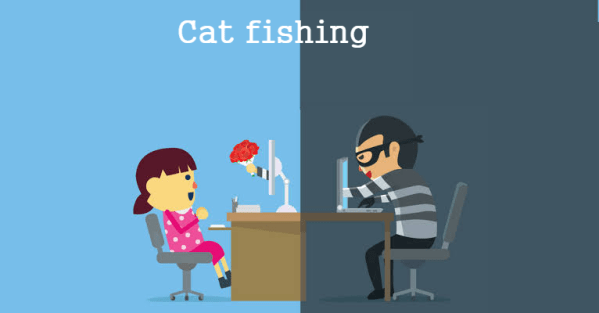
1. Cat-fishing

Cat-fishing is an internet scam in which a cyber-criminal makes a fake online profile to allure a victim into a fictitious online relationship — for the most part, to get money or different benefits from the victim.

2. Profile Hijacking

The Facebook profile commandeer is another interpretation of utilizing a fake profile for accursed methods. For this situation, cybercriminals regularly utilize the properties and subtleties of real people — like their photos, old neighborhood and occupation — to set up profiles pretending to be that individual.

3. Quizzes May Mine Your Information

Which “Stars Wars” character would you say you are? What city would you say you were intended to live in? Which big name is your perfect partner? Sound recognizable? These are for the most part popular quizzes that have been broadly shared on Facebook, entreating users to take a couple of moments for what appears innocuous enjoyment.

However, the Better Business Bureau (BBB) cautions that some quizzes are intended to steal your information in an out and out scam.

4. URL-Shortening Cons

While URL shorten are valuable for sharing a website link inside a tight character limit, for example, Twitter, they can likewise be utilized to cover a malicious page.

5. Money-Flipping

Money-flipping is a developing financial scam on Instagram and other social media channels. Criminals try to blackmail money from users by persuading them to make a bum investment.

How to Deal with Social Media Scam?

1. Never click on pop-up messages, posts that contain content that appears to be stunning, shameful, or unrealistic, or links or attachments in spontaneous emails and instant messages.

2. Make a strong password. This implies it is at least seven characters and contains a blend of upper and lower case letters, symbols, and numbers. You ought to never give your password to somebody you don’t have a clue.

3. Try not to give your information (personal or financial) online except if you know the website you are utilizing is genuine, secure, and scrambled. It is additionally essential to ensure that you are managing the correct entity and utilizing its real website and not a clone web page made by a trick specialist. Additionally, search for “https” before a web address.

4. Delete spontaneous emails and instant messages that solicitation personal or account information. Companies you work with as of now have this information and don’t have to check or affirm it. In the event that there is a security breach, most companies contact their clients recorded as a hard copy to alarm them of the breach.

5. Contact companies just through confided in channels. In the event that you are worried about an email or other message you got, call the company quickly at its publicly-recorded phone number. Never trust the phone number or email address given in the message.

6. Add total security antivirus to your device to trace the suspicious activity.

7. Try not to be raced into sending cash quickly or secretly. Try not to send cash by wire transfer, medium-term conveyance, or re-loadable cards except if you are sure beyond a shadow of a doubt that you are sending cash to a real companion or family member.

Website Powered by WordPress.com.

Up ↑

Design a site like this with WordPress.com
Get started